BSEtunes .NET WinUI Client v1.0.0
BSE.Tunes.WinUI.Client is the modern WinUI 3 desktop client for the private BSEtunes music system, replacing the former UWP app. It brings the same “neighborhood Spotify” experience to current Windows app technology with a clean, MVVM-based architecture.
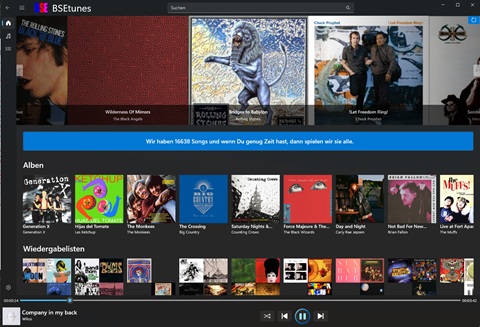
The application focuses on comfortable everyday listening while keeping the system private and controlled. Users can browse and play single songs, start complete albums, use their own playlists, and enjoy randomized playback across selected BSEtunes content.
Authentication is required to connect to the backend, so access is restricted to authorized users managed by the server operator.
Main features
- Modern WinUI 3 desktop experience (replacement for the legacy UWP client)
- Track playback for individual songs
- Album playback from start to finish
- Playlist support for self-created listening collections
- Random playback over selected library content
- Secure, login-based access to the private BSEtunes server
- Multilingual UI with German and English support
Role in the BSEtunes system
The client is one part of the full BSE stack, which also includes:
- the BSEadmin tool for managing music content, and
- the BSEtunes Web API backend for streaming and data access.
- the BSE.Identity user management application
- the BSEtunes MAUI client for ios and android
Important!!
Due to copyright restrictions on the streamed music files, server load, and potentially limited bandwidth during server operation, a connection without a login is not possible. Therefore, you need a user account to connect to our server.
- You are not able to register yourself as a user via the app, your will be invited.
- A registration can only be done by the operator of the BSEtunes server.
Questions??
If you have questions, here’s the source code.
Downloads
Windows Devices
click to install it on a Windows device
IOS Devices
Registered users can install an adhoc distribution version of the app.
click to install it on an Apple device